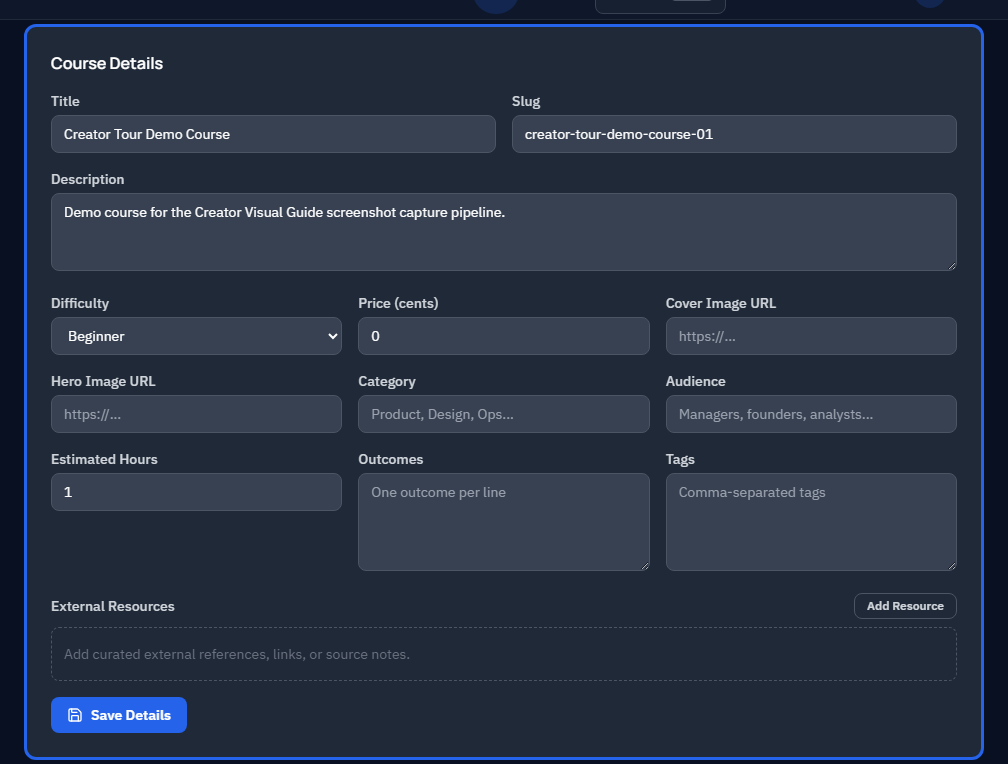
The basics panel covers your course title, description, cover image, and tags.
Why it matters
These fields appear on the public course catalog. Spend a minute here -- it is your shopfront. A clear title and compelling description are the first things prospective learners see.
Fields
- Title -- keep it concise and descriptive. Include the skill or tool the learner will gain.
- Description -- summarize what learners will achieve. Aim for 2-3 sentences that answer "why should I take this course?"
- Cover image -- a 16:9 image that represents the course visually. This appears on course cards and the course preview page.
- Tags -- categorize the course so learners can discover it through filters and search.
Tips
- Write the description from the learner's perspective: "You will learn..." or "By the end of this course, you can..."
- Choose tags that match the role and skill level of your target audience.
- Preview how your cover image looks on a course card before moving on.