Claude Code in Telegram: Stop Babysitting Your Agents
On this page
The agent should not need you to stare at the terminal
Claude Code is most useful when it can take a meaningful task, work through files, run checks, and come back with evidence. The awkward part is the waiting. You start a task, step away, miss a permission prompt, check too often, or return after a long run only to find that the agent finished twenty minutes ago.
Telegram is a practical way to remove that babysitting loop. Not because your phone should become an unsafe root shell, but because the agent should be able to tap you on the shoulder when something matters.
The useful mental model is simple:
- Hooks are for notifications.
- Channels are for two-way chat.
- Permissions are for authority.
If you keep those three jobs separate, Telegram becomes a lightweight operations room for agent work. You can see when Claude Code needs input, when a subagent finishes, when validation fails, and when a task is ready for review. If you enable the official Telegram channel, you can also reply from Telegram and send new instructions into the running session.
That distinction matters. A good setup gives you visibility before autonomy. The same discipline shows up in our Claude 101 and Full-Stack Developer with AI courses: first make the workflow observable, then decide which actions are safe to delegate.
What you will be able to do
By the end of this guide you will be able to:
- Get a Telegram ping the moment Claude Code needs a decision or finishes a task.
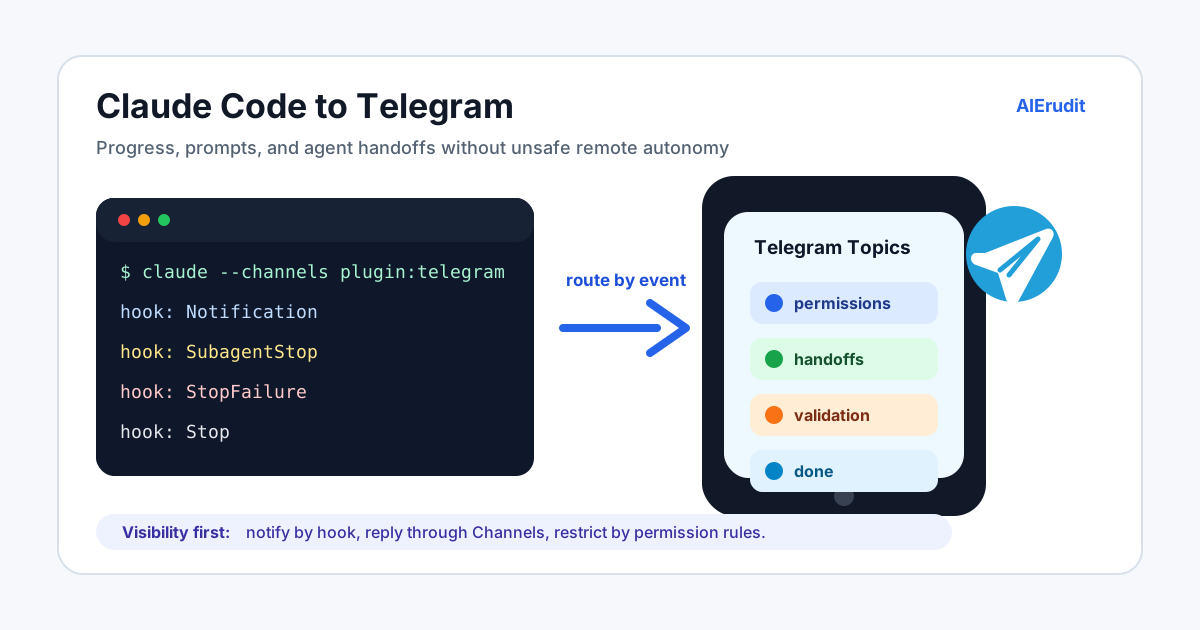
- Route different agents and event types into different Telegram topics, so the noise stays organized.
- Reply from your phone to steer a running session: ask for status, add a constraint, or tell Claude to wait.
- Understand the current one-bot-token limit and design around it for multiple parallel sessions.
- Keep destructive actions behind your permission rules, even when chat is wide open.
- Know when Telegram is the right surface and when the Claude mobile app (Remote Control) is better.
Each section below adds one capability on top of the last. You can stop after the first one and still get most of the value.
Three ways to reach a Claude Code session from your phone
There are three different ways to connect Claude Code to a phone-friendly surface. They are often discussed as one thing, but they solve different problems.
| Path | What happens | Best for | Main control |
|---|---|---|---|
| Hook notifications | Claude Code fires a lifecycle event and a small script sends a Telegram message through the Bot API. | Completion alerts, permission prompts, subagent handoffs, validation failures. | Hook configuration and your script. |
| Claude Code Channels | Telegram, Discord, or iMessage messages are pushed into an already-running Claude Code session through an official channel plugin, and Claude can reply back. | Asking for status, sending follow-up instructions, lightweight phone-based steering. | Channel allowlist plus Claude Code permissions. |
| Remote Control | You drive your local Claude Code session from the Claude mobile app (iOS and Android) or claude.ai. | Full session visibility, remote permission prompts, one-command setup. | Claude Remote Control session controls. |
If you only want to know when Claude Code is done, use hooks. If you want to answer or nudge Claude from Telegram, use Channels. If the task needs careful permission handling and a richer view of the session, the Claude mobile app through Remote Control is usually the better interface.
A quick note on timeline, because these features are new: Remote Control arrived as a research preview in February 2026, and Channels (Telegram and Discord first, then iMessage) followed in March 2026. Both are still preview features, so command syntax can change. The commands below match the current official docs at the time of writing.
Before you start: what each path needs
The two patterns have very different prerequisites, and mixing them up is the most common reason a setup "does not work."
| Path | Requirements |
|---|---|
| Hook notifications | A Telegram bot token, a chat ID, and any runtime that can send an HTTPS POST (the example below uses Node). No special Claude Code version, no Bun, no subscription tier. |
| Claude Code Channels | Claude Code v2.1.80 or later, the Bun runtime (the channel plugins are Bun scripts), and Anthropic authentication through claude.ai or a Console API key. On Team and Enterprise plans an owner must enable Channels first. |
Check Bun before you try Channels:
bun --version
  # if that fails, install Bun:
curl -fsSL https://bun.sh/install | bash
Pro and Max users without an organization skip the enterprise checks entirely. Team and Enterprise users need the owner step covered later in this article. The hook path needs none of this, which is exactly why it is the right place to start.
The fast path: send Claude Code hooks to Telegram
The minimal version takes about ten minutes:
- Create a Telegram bot with BotFather.
- Get the bot token.
- Get the target chat ID, and optionally a topic ID.
- Add a small hook script to your project or user Claude directory.
- Configure Claude Code to call that script on useful lifecycle events.
In Telegram, open BotFather and run /newbot. BotFather asks for a display name and a username ending in bot, then returns a token that looks like 123456789:AAH.... Treat that token like a password. Do not commit it to Git, paste it into screenshots, or share it in a team chat.
For a one-way notification bot, the Telegram Bot API method you need is sendMessage. It requires a chat_id and accepts an optional message_thread_id when you want to post into a forum topic.
Create a script such as .claude/hooks/telegram-notify.mjs:
import { readFile } from "node:fs/promises";

const raw = await readFile(0, "utf8").catch(() => "{}");
let event = {};

try {
  event = JSON.parse(raw || "{}");
} catch {
  process.exit(0);
}

const token = process.env.TELEGRAM_BOT_TOKEN;
const chatId = process.env.TELEGRAM_CHAT_ID;
const threadId = process.env.TELEGRAM_THREAD_ID;

if (!token || !chatId) {
  process.exit(0);
}

const hookName = event.hook_event_name || "Claude Code";
const notificationType = event.notification_type ? `\nType: ${event.notification_type}` : "";
const session = event.session_id ? `\nSession: ${event.session_id}` : "";
const cwd = event.cwd ? `\nWorktree: ${event.cwd}` : "";

const text = [
  `[Claude Code] ${hookName}`,
  notificationType,
  session,
  cwd,
  "\nCheck the terminal or reply through Channels if this session is channel-enabled."
].join("");

const body = {
  chat_id: chatId,
  text,
  disable_web_page_preview: true
};

if (threadId) {
  body.message_thread_id = Number(threadId);
}

await fetch(`https://api.telegram.org/bot${token}/sendMessage`, {
  method: "POST",
  headers: { "content-type": "application/json" },
  body: JSON.stringify(body)
});
Then wire it into Claude Code settings. For a project-level setup, use .claude/settings.json only if the script is safe to share and contains no secrets. For personal settings, use your user settings or a local settings file that is not committed.
{
  "hooks": {
    "Notification": [
      {
        "matcher": "permission_prompt|idle_prompt|elicitation_dialog",
        "hooks": [
          {
            "type": "command",
            "command": "node .claude/hooks/telegram-notify.mjs",
            "timeout": 10
          }
        ]
      }
    ],
    "SubagentStop": [
      {
        "hooks": [
          {
            "type": "command",
            "command": "node .claude/hooks/telegram-notify.mjs",
            "timeout": 10
          }
        ]
      }
    ],
    "Stop": [
      {
        "hooks": [
          {
            "type": "command",
            "command": "node .claude/hooks/telegram-notify.mjs",
            "timeout": 10
          }
        ]
      }
    ],
    "StopFailure": [
      {
        "hooks": [
          {
            "type": "command",
            "command": "node .claude/hooks/telegram-notify.mjs",
            "timeout": 10
          }
        ]
      }
    ]
  }
}Notification, SubagentStop, Stop, and StopFailure are all real Claude Code hook events. Notification fires when Claude needs your attention, such as a permission prompt or an idle wait; Stop fires when the main turn finishes; SubagentStop fires when a tool-spawned subagent completes; StopFailure fires when the turn ends because of an error. Set the environment variables before launching Claude Code:
export TELEGRAM_BOT_TOKEN="123456:replace-me"
export TELEGRAM_CHAT_ID="-1001234567890"
export TELEGRAM_THREAD_ID="42"
claude
On Windows PowerShell:
$env:TELEGRAM_BOT_TOKEN = "123456:replace-me"
$env:TELEGRAM_CHAT_ID = "-1001234567890"
$env:TELEGRAM_THREAD_ID = "42"
claude
The script should fail quietly when the environment variables are missing. That keeps shared projects from breaking for teammates who have not set up Telegram.
Route different agents to different Telegram topics
The basic hook sends every message to one chat. That works for a solo developer. It becomes noisy when you have multiple sessions, subagents, or QA lanes.
Telegram forum topics give you a cleaner layout:
| Topic | What goes there | Hook events |
|---|---|---|
permissions |
Claude needs a human decision. | Notification with permission or elicitation types, PermissionRequest if you choose to hook it. |
handoffs |
A subagent finished and its result needs review. | SubagentStop, TaskCompleted. |
validation |
Tests failed, CI failed, or the agent hit an API error. | StopFailure, custom validation hooks. |
done |
The main turn finished and is ready to inspect. | Stop. |
ops-alerts |
Long-running agent teams are idle or blocked. | TeammateIdle, scheduled monitors. |
With a custom wrapper, topic routing can be as simple as mapping the hook event to a message_thread_id. The Telegram Bot API supports message_thread_id for forum topics, so the hook does not need to create separate bots for separate lanes.
This topic routing is a property of the outbound hook pattern, not of the official Telegram channel plugin. The plugin's inbound model is direct messages and groups, not per-topic delivery. So: use hooks plus message_thread_id to fan out notifications into topics, and use Channels (next section) when you want to reply.
Route Claude Code events to Telegram topics
One bot, four lanes, one human review point.
Nodes
Lifecycle event
Event class?
Topic: permissions
Topic: handoffs
Topic: validation
Topic: done
Human review
Connections (9)
- Lifecycle event → Event class?
- Event class? → Topic: permissions (Notification), Topic: handoffs (SubagentStop), Topic: validation (StopFailure), Topic: done (Stop)
- Topic: permissions → Human review
- Topic: handoffs → Human review
- Topic: validation → Human review
- Topic: done → Human review
Notify on decisions, handoffs, failures, and final review -- not every tool call.
Do not route every PostToolUse event into Telegram. That turns a useful signal into a scrolling log. A better rule is: notify when a human decision, handoff, failure, or final review is needed.
When you need to answer from Telegram, use Channels
Hooks are outbound. They tell Telegram that something happened. They do not make Telegram a proper input surface.
For two-way interaction, use Claude Code Channels and the official Telegram plugin. The plugin runs an MCP server on Bun that logs in as your bot; when you message the bot, the server forwards the message into your session, and Claude can reply, react, or edit through the same chat. In the official flow:
- Confirm Bun is installed (
bun --version) and that you are on Claude Code v2.1.80 or later. - Create a bot with BotFather.
- Install the Telegram plugin in Claude Code and reload:
/plugin install telegram@claude-plugins-official
/reload-plugins- If the marketplace is missing or stale, add or update it, then retry:
/plugin marketplace add anthropics/claude-plugins-official
/plugin marketplace update claude-plugins-official
/reload-plugins- Configure the token (saved to
~/.claude/channels/telegram/.env):
/telegram:configure <token>- Restart Claude Code with the channel enabled. The server will not connect without this flag:
claude --channels plugin:telegram@claude-plugins-officialTelegram is not the only channel. The same plugin family includes Discord and iMessage, configured the same way (plugin:discord@claude-plugins-official, plugin:imessage@claude-plugins-official). iMessage needs macOS and Full Disk Access instead of a bot token. Pick whichever your team already lives in; the rest of this guide uses Telegram.
If Claude Code reports that Channels are blocked by org policy, the Telegram bot can be configured correctly and still appear silent. In Team and Enterprise environments, this is not a project setting and not a token problem. An organization owner has to enable Channels in managed settings (or through claude.ai, Admin settings, Claude Code, Channels) before inbound Telegram messages can reach the session:
{
  "channelsEnabled": true
}
If the organization also uses a channel-plugin allowlist, the owner has to add Telegram from claude-plugins-official:
{
  "channelsEnabled": true,
  "allowedChannelPlugins": [
    {
      "marketplace": "claude-plugins-official",
      "plugin": "telegram"
    }
  ]
}
There are three separate gates here:
| Gate | Who controls it | What it does |
|---|---|---|
| Organization Channels setting | Organization owner or admin with managed-settings authority. | Allows Claude Code to receive inbound channel messages at all. |
| Organization channel-plugin allowlist | Organization owner or admin with managed-settings authority. | Decides whether plugin:telegram@claude-plugins-official is allowed as a channel. |
| Telegram access allowlist | The local Claude Code session owner after pairing. | Decides which Telegram users can reach this specific assistant session. |
Pro and Max users without an organization skip the first two gates entirely; for them only the session-level allowlist applies. If you are on a Team or Enterprise plan and are not the owner, you cannot fix a blocked Channels policy from .claude/settings.json, the project repository, or the Telegram bot. The practical options are to ask the owner to enable Channels and allow the Telegram plugin, or to use one-way hook notifications until the policy changes.
- Send any message to the bot in Telegram. The bot replies with a six-character pairing code.
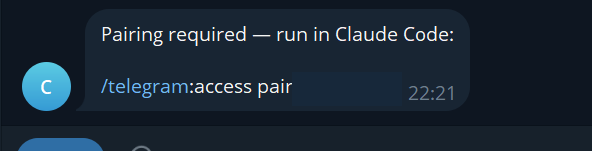
- In Claude Code, pair the account. You will see Claude read
~/.claude/channels/telegram/access.jsonand approve the code:
/telegram:access pair <code>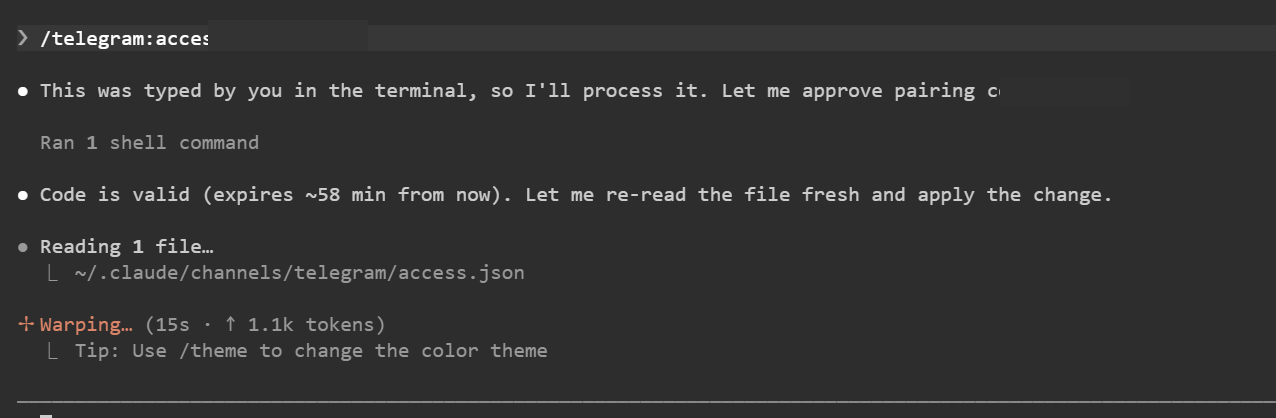
- Lock down access. Pairing only exists to capture your numeric Telegram ID; once you are in, switch to allowlist so strangers cannot even get a pairing-code reply:
/telegram:access policy allowlist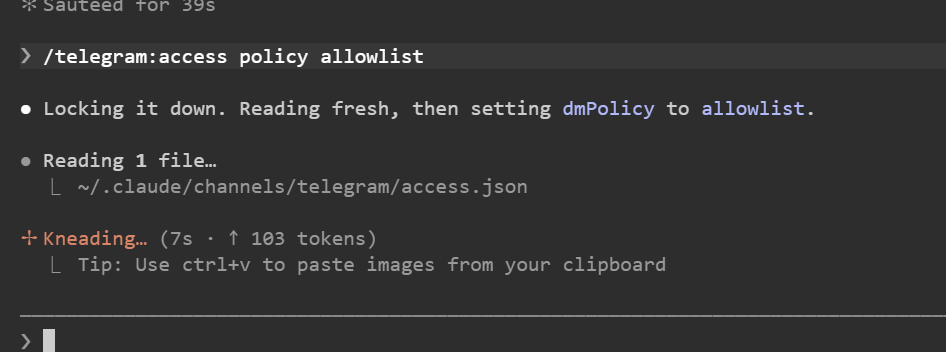
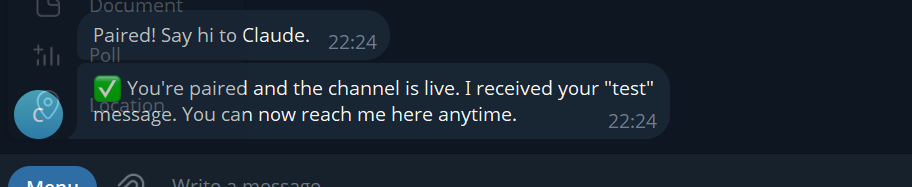
This is the session-level access list. It does not replace the organization-level plugin allowlist. The organization decides whether Telegram can be used as a channel; the session decides which paired Telegram users may talk to this assistant.
Now Telegram can act like a chat bridge into the running local session. When the round trip is live, Telegram itself confirms it:
Talk back, react, and watch progress
Once Channels are live, the conversation is genuinely two-way. You can ask for status, add a constraint, paste a small clarification, or tell Claude to continue with a safer plan. Good Telegram prompts are short and operational:
status?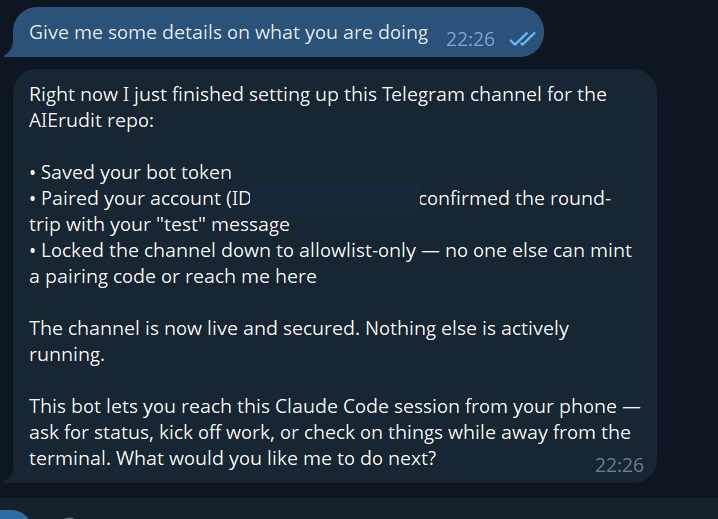
Pause before editing payments code. Summarize the files you plan to touch.QA found mobile overflow on the dashboard. Re-check 390px width before final.Do not deploy. Prepare the PR body and wait.The plugin also shapes how Claude answers, which is what makes this feel like monitoring rather than blind fire-and-forget:
- Claude can
replywith text and even attach files (screenshots, a generated diff), so you can review evidence on your phone. - Claude can
reactwith an emoji from Telegram's fixed whitelist, a cheap way to acknowledge "got it, working" without a full message. - Claude can
edit_messageto turn a "working..." line into the final result, so a long task updates in place instead of spamming you. - Inbound messages trigger a typing indicator automatically, so you can see the session is alive and thinking.
Two limits are worth knowing. Telegram's Bot API exposes no history and no search, so the bot only sees messages as they arrive; if Claude needs earlier context it will ask you to paste it. And in a group, the bot replies only when it is @mentioned or directly replied to (requireMention). If you want it to read every message in a group, you also have to disable Telegram's server-side privacy mode in BotFather (/setprivacy, pick the bot, Disable), or the messages never reach the plugin at all.
The official Channels docs make an important point: channel messages only reach an open session, and access is controlled by the channel allowlist and the session's enabled channels. That is a feature, not a limitation. A Telegram chat should not silently acquire permanent access to every local repository.
The current rough edge: one bot token, one live session
There is one limitation you should understand before you rely on Telegram for parallel agent work.
Pairing is not per session. Once you pair a Telegram account and put it in the allowlist, that access is stored in the Telegram channel configuration and can persist across restarts. You do not need to pair the same user every time you open Claude Code.
The active bot connection is different. With the current Telegram channel behavior, a single bot token is effectively bound to one live Claude Code session at a time. You can have several Claude Code sessions open with the Telegram plugin installed, but Telegram DMs route to whichever session most recently claimed the bot connection. If a newer session starts the Telegram poller, it becomes the session that receives the messages.
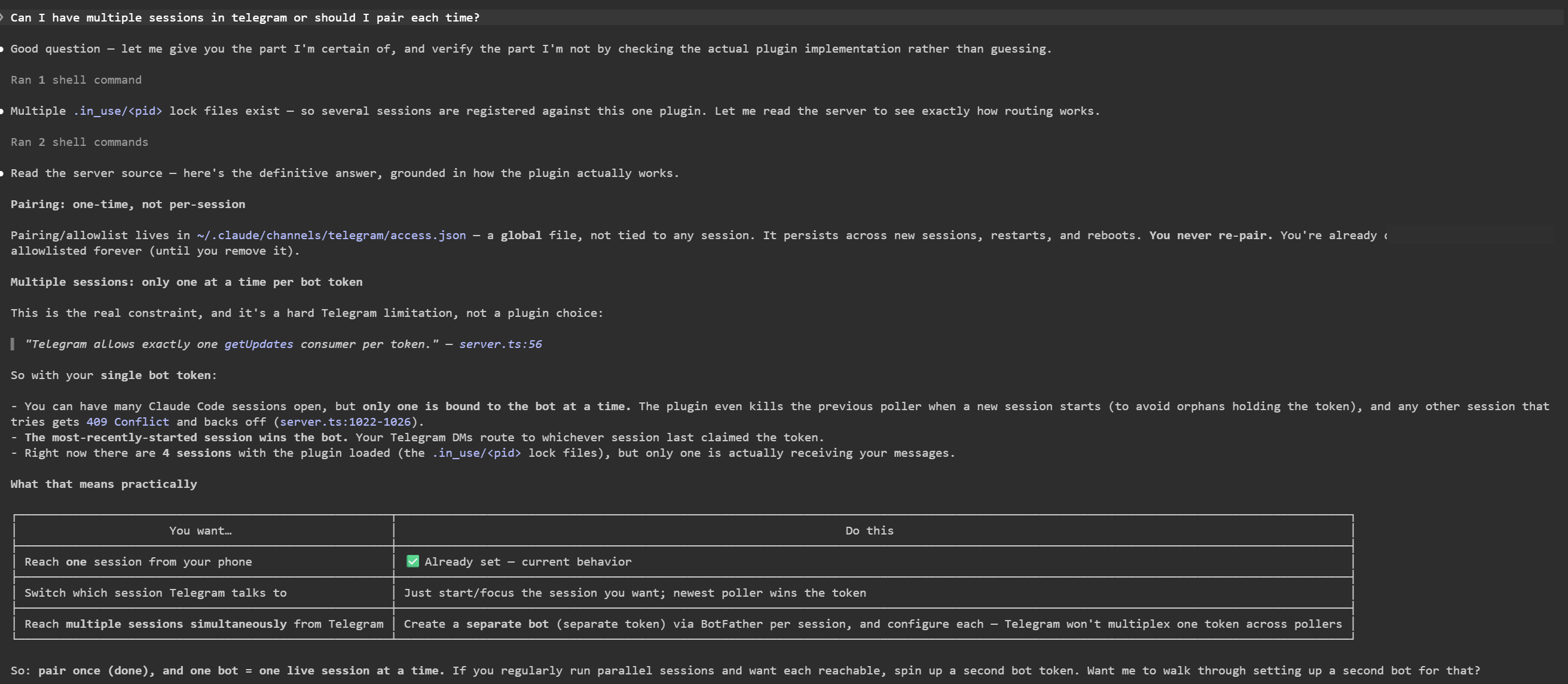
The official way to run several bots on one machine is TELEGRAM_STATE_DIR: point each Claude Code instance at its own state directory so each gets its own token and its own allowlist.
  # Session A
export TELEGRAM_STATE_DIR="$HOME/.claude/channels/telegram-a"
claude --channels plugin:telegram@claude-plugins-official

  # Session B (different bot token saved under this dir)
export TELEGRAM_STATE_DIR="$HOME/.claude/channels/telegram-b"
claude --channels plugin:telegram@claude-plugins-official
That is the behavior to design around today:
| You want... | Do this |
|---|---|
| Reach one Claude Code session from your phone | Use one bot, pair once, and keep the desired session active. |
| Switch which session Telegram talks to | Start or focus the session you want to bind to the bot; the newest active channel session wins. |
| Reach several sessions from Telegram at the same time | Give each session its own bot token and its own TELEGRAM_STATE_DIR. |
| Watch several sessions without replying to each one | Prefer one-way hook notifications into topics or separate chats. |
This is why I would not sell Telegram Channels as a complete multi-session command center yet. It is excellent for one active remote conversation. For multiple concurrent agents, treat it as one control lane per bot token, then use separate bot tokens or hook-based notifications for the rest.
Prefer the Claude mobile app when you need full control
Telegram is the right tool for quick, chat-style steering. But Anthropic also ships a dedicated path for driving a session from your phone: Remote Control, which connects your local Claude Code session to the Claude mobile app (iOS and Android) or claude.ai in the browser. Your session keeps running on your own machine the whole time; the app is just a remote head for it.
Remote Control is usually the better choice when:
- You need to see and approve permission prompts remotely, with full context, rather than just a chat ping.
- You want the richer session view, including the plan and the files in play, not only the latest message.
- You are away from your desk and want close, careful control of a sensitive task.
Telegram Channels are usually the better choice when:
- You want a fast, native chat experience and push notifications you already trust.
- You want lightweight team collaboration in a shared chat or topic.
- You only need to nudge the session occasionally, not supervise it closely.
For completeness, Claude Code has a few other off-terminal surfaces that solve adjacent problems: Claude Code on the web spins up a fresh cloud session from GitHub, and Claude in Slack starts a web session from an @Claude mention. Channels are the one that pushes events into the session you already have open. Match the surface to the job, and do not try to make Telegram do all of it.
Do not turn Telegram into an unsafe production button
The danger is not Telegram. The danger is confusing a convenient chat interface with an authority model.
If a channel can send messages into a Claude Code session, then the people allowed in that channel may influence local tools, files, Git, package managers, browsers, cloud CLIs, and deployment scripts. Channels that declare the permission-relay capability can even forward permission prompts to chat, which means anyone on the allowlist could approve or deny a tool call. Your permission rules, and who you trust on the allowlist, still decide what the agent may do.
Use this control table before enabling two-way access:
| Risk | Practical control |
|---|---|
| Bot token leaks | Store the token in an environment variable or Claude's local channel env file. Rotate it through BotFather if exposed. |
| Anyone can message the bot | Pair only trusted users and switch the Telegram channel to allowlist mode. |
| A group chat becomes too broad | Use a private bot or a restricted engineering supergroup. Avoid public or mixed-audience groups. |
| Agent posts secrets into Telegram | Redact hook messages. Send event summaries, not raw prompts, diffs, .env values, logs, or customer data. |
| Remote user approves risky tool use | Keep destructive shell commands, deploys, production database writes, payment changes, and secret access in ask or deny. Only allowlist people you trust with that authority. |
| Notifications become spam | Notify on milestones and exceptions. Avoid per-tool-call updates. |
| Topic routing hides context | Include session ID, worktree, branch, and task label in each message, but keep private names out of public screenshots. |
| A channel is enabled accidentally | Start Claude Code with explicit --channels only for sessions that need it. |
The safest sequence is:
- Build one-way hook notifications first.
- Tune the event list until messages are useful.
- Add topic routing if multiple lanes are active.
- Enable Channels only for sessions that need remote replies.
- Keep Remote Control and the Claude mobile app available when permission prompts and full visibility matter more than chat convenience.
A useful notification design for real agent work
A good setup should answer five questions:
- What is the agent doing?
- Does it need a human?
- Which lane owns the next decision?
- Is the task blocked, failed, or done?
- Where should the human inspect evidence?
For most teams, this is enough:
| Message type | Example message | Why it helps |
|---|---|---|
| Needs permission | Claude Code needs approval for Bash(git push *) in worktree blog-draft. |
The human knows the exact kind of decision. |
| Idle / input needed | Session is waiting for clarification: choose seed publication or source pack only. |
Avoids silent stalls. |
| Subagent complete | QA subagent finished mobile pass. Two issues found, evidence in handoff. |
Routes review to the right owner. |
| Validation failed | pytest failed in backend auth tests. See terminal for stack trace. |
Pulls attention to failures without dumping logs. |
| Ready for review | Stop: draft complete. Files changed: publish-body.md, source-brief.md, cover.svg. |
Makes the final check obvious. |
This is where topic routing becomes more than a nice-to-have. A product owner can watch handoffs, QA can watch validation, and the developer can keep permissions loud enough to avoid missed prompts. In a larger agent-team workflow, each persona does not need its own chat app. It needs clear routing, short messages, and durable evidence back in the repo.
The same operating discipline is useful beyond Claude Code. In AI Agentic Patterns, we teach agent systems as handoff loops: task, evidence, reviewer, next action. Telegram is just one transport for that loop.
What screenshots to capture
Screenshots are worth doing carefully because this article is about trust. Readers want to see that the setup is real, but they should not see private tokens, chat IDs, usernames, repo names, customer data, or pairing codes.
This article already ships sanitized captures of the pairing prompt, the pair command, the allowlist lockdown, the live-channel confirmation, a status reply, and the one-bot-token limit. If you are documenting your own setup, capture the same moments, plus a couple this article does not show:
- BotFather creating a bot with the token blurred.
- Claude Code installing
telegram@claude-plugins-official. claude --channels plugin:telegram@claude-plugins-officialstarting successfully.- A Telegram supergroup with topics such as
permissions,handoffs,validation, anddone. - The first hook notification from a harmless toy task.
- Optional: the Claude mobile app via Remote Control, side by side, to show when a richer remote interface is better.
Two practical tips. Capture terminal shots at a narrow window width so the text stays legible when the image is scaled down into a blog column; a full-width terminal becomes an unreadable strip. And the single most reusable screenshot is the topic layout: it explains the whole operating model in one image (one bot, several lanes, clear ownership, no secret data).
Practical setup checklist
Before you call the setup done, run this checklist:
- Bot token is stored outside Git.
- For Channels: Bun is installed and Claude Code is v2.1.80 or later.
- Hook script exits quietly when Telegram environment variables are missing.
- Telegram messages contain summaries, not raw secret-bearing payloads.
Notification,SubagentStop,Stop, andStopFailureare considered before adding noisier hooks.- Forum topic IDs are documented in a local-only file if you use topic routing.
- Telegram Channels are enabled only in sessions that need two-way chat.
- Access policy is set to allowlist after pairing.
- Destructive commands, deploys, production database writes, secret reads, and payment changes still require explicit local review.
- Screenshots are sanitized before they enter the blog CMS, course material, or sales collateral.
The course path
If you are new to Claude Code, start with Claude 101. Get comfortable with sessions, permissions, tools, and project context before adding chat bridges.
If you are already using coding agents for implementation, continue with Full-Stack Developer with AI. Telegram notifications fit naturally into long-running build, test, and review loops.
If your team is experimenting with multiple agents or delegated QA, use AI Agentic Patterns to design handoffs before you automate them.
And if the setup touches production infrastructure, customer data, payments, or security-sensitive repositories, pair it with AI Governance, Risk, and Secure Operations. Remote control is useful only when the authority model is explicit.
Continue learning with these courses
Sources and Further Reading
- Claude Code Hooks referencecode.claude.com
- Claude Code hooks guidecode.claude.com
- Claude Code Channelscode.claude.com
- Claude Code Channels referencecode.claude.com
- Claude Code permissionscode.claude.com
- Claude Code settingscode.claude.com
- Claude Code Remote Controlcode.claude.com
- Anthropic official Telegram plugin sourcegithub.com
- Telegram Bot APIcore.telegram.org
- Telegram Bot Features and BotFathercore.telegram.org
- Bun runtimebun.sh
- Alex Op: Claude Code notification hooksalexop.dev
- MacStories: hands-on with Claude Code Telegram and Discord integrationsmacstories.net
- Shareuhack: Claude Code Channels hands-onshareuhack.com
- TechRadar: Claude Code Remote Control coveragetechradar.com
Stay ahead with AI insights
Get practical AI tips, new course announcements, and career strategies delivered weekly.
Stay ahead with AI insights
The signup form opens as soon as this page finishes loading. If it does not appear — for example if JavaScript is unavailable — email us and we will subscribe you.